Grok Spicy mode is the setting inside xAI’s Grok Imagine generator that unlocks sensitive — including nude — image and short-video output, and it has become one of the most searched and most controversial AI features of the year. If you landed here, you probably want a straight answer about what it does, how to turn it on, and whether it’s safe to use. This guide gives you that, without prompt recipes, bypass tricks, or hype.
18+ note. This article discusses an adult-oriented AI feature. It is intended for readers 18 and over. It contains no explicit content, and it does not provide any guidance for generating sexual imagery of real people.
Quick answer
- Where it lives: Grok Spicy mode is inside Grok Imagine, xAI’s image-and-video generator — it is not a chat toggle in the Grok assistant.
- What it is: a render mode for visuals (alongside Normal, Fun, and Custom) that allows sensitive output, including nudity, on stills and short clips.
- How you unlock it: age-verified X account + the “display sensitive media” setting turned on + a Grok / X Premium tier that includes Imagine’s Spicy render.
- Why you might not see it: region rollout, Android build lagging iOS, age verification incomplete, or a plan tier that doesn’t include it. xAI’s own pricing page is the source of truth — we don’t quote dollar figures here.
- The hard line: never generate sexual or nude imagery of a real, identifiable person. Skip ahead to the safety section if you want the why.
- Different tool, different need: if you want a companion rather than a one-shot render, an adult chat product is a better shape of tool than a public image generator.
What is Grok’s Spicy mode?
Grok Spicy mode — sometimes written grok ai spicy mode in older coverage — is a content setting inside Grok Imagine, xAI’s image and short-video generator built into the Grok and X apps. Grok Imagine turns a text prompt (and in some flows, a still image) into a still or a short clip — typically in the range of about 6 to 15 seconds. When Spicy mode is active, that output can include sensitive visual material, including partial or full nudity, within xAI’s policy limits.
Two things are important to understand up front. First, Spicy mode is a visual feature. It changes what Grok Imagine is willing to draw or animate. It is not a chat toggle that makes the Grok chatbot start sending you explicit messages. Second, the feature lives behind several layers of gating — account age verification, a sensitive-media display setting in X, and, on most accounts, a paid tier — so the experience is not the same for everyone.
Spicy mode vs. Grok’s other modes
People often conflate Grok’s various “modes,” so a quick contrast helps:
- Standard / default Grok chat — text conversation with the Grok assistant. Not where Spicy lives.
- Fun mode (chat) — a looser, more playful personality for text chat. Still not Spicy.
- Custom personas — user-shaped chat personalities, again on the text side.
- Grok Imagine — Normal / Fun / Custom / Spicy — these are render modes for the image-and-video generator. Spicy is the only one that intentionally allows sensitive visual output.
So when you read “grok spicy ai,” assume the writer means the Grok Imagine render mode — not a chat setting.
Grok Imagine Spicy Mode — What “Imagine” Means Here
A lot of confusion in the grok imagine spicy mode search results comes from people treating “Grok Imagine” and “Spicy” as the same thing. They aren’t.
Grok Imagine is the host product — xAI’s text-to-image and text-to-short-video generator inside the Grok / X apps. It’s a much broader feature than Spicy. Imagine has its own pipeline, its own prompt system, and its own pricing. Most uses of Grok Imagine are SFW: still images, marketing-style illustration, short stylized clips. We’ll publish a fuller standalone Grok Imagine guide soon — this article is specifically about the Spicy render mode, which is one of several mode toggles available inside Imagine.
The relationship looks like this:
- Grok Imagine = the generator (the app surface).
- Render mode = how Imagine is allowed to draw the prompt. The menu typically includes Normal, Fun, Custom, and Spicy.
- Spicy = the only render mode that intentionally unlocks sensitive/nude output, gated behind age verification, sensitive-media settings, and a paid tier.
That distinction matters in two practical ways. One, if a tutorial says “open Grok Imagine and tap Spicy,” that’s accurate — but if a tutorial says “Grok Imagine is Spicy,” that’s wrong. Two, if Imagine is available in your region but the Spicy mode chip is greyed out or missing, you’re usually looking at a gating issue, not a missing product. That’s the next section.
How to enable Spicy mode in Grok
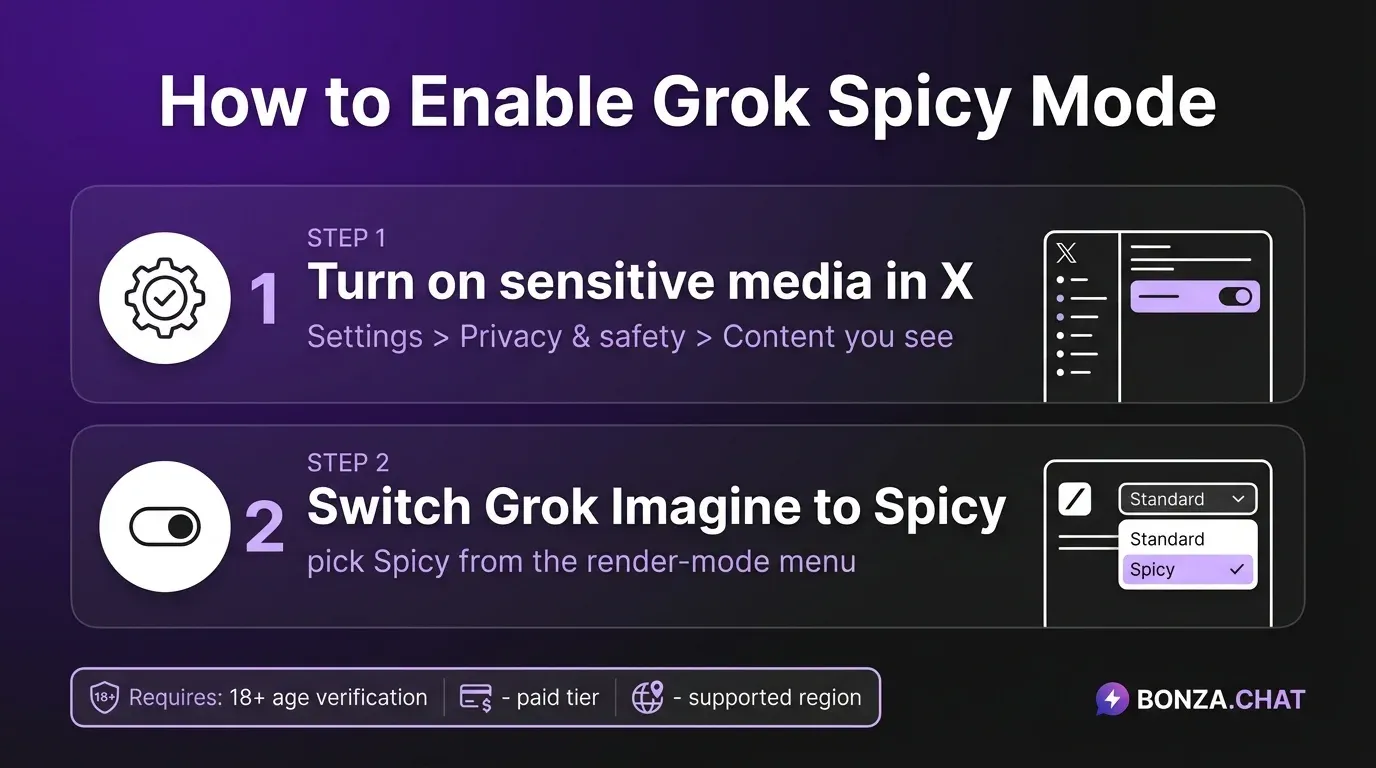
The activation flow is publicly documented by xAI and third-party guides. It is intentionally not one click, because the feature is age- and content-gated. At a high level, there are two places you need to look. (This is the answer to the how to enable spicy mode grok searches; everything after this is detail.)
1. Allow sensitive media in your X account. Per the official @grok post on X, Spicy output is hidden until your account is set to display sensitive media. In the X app, that path is typically:
Settings and privacy → Privacy and safety → Content you see → enable the option for displaying media that may contain sensitive content.
Your account also needs to be age-verified as 18+. Labels and exact wording shift between app versions and regions, so defer to the in-app copy you actually see.
2. Switch Grok Imagine into Spicy. Inside Grok Imagine itself, there is a render-mode selector. According to Sider AI’s walkthrough, you pick Spicy from the same mode list that contains Normal, Fun, and Custom before generating an image or short video.
That’s the whole high-level flow. This guide will not provide prompt recipes, “uncensored prompt” lists, or any workaround for Grok’s safety filters — and especially not anything that helps produce imagery of a real, identifiable person. If a tutorial elsewhere offers those, treat that as a red flag, not a feature.
Why Spicy mode might be “not available” for you
A lot of search traffic for grok spicy mode not available comes from users who followed a tutorial and still don’t see the option. Usually it’s one of these:
- Subscription tier. xAI gates Grok Imagine — and Spicy specifically — behind paid Grok / X Premium tiers in many regions. The exact tier and price change over time, so check xAI’s own current pricing rather than trusting any number you read in a blog post (including this one).
- Region. Availability has rolled out unevenly. Some countries see Grok Imagine but not Spicy; some see neither.
- Age verification not completed. If your X account hasn’t gone through age verification, the sensitive-media setting won’t unlock for you, and Spicy stays hidden.
- Sensitive-media setting still off. This is the most common cause. The Imagine app reads the X account preference; if that switch is off, Spicy output is suppressed even when the mode appears available.
- App version, especially on Android. Rollout has lagged iOS in multiple updates. If you’re on an older Android build, update the app — and if your region’s Android build still doesn’t expose it, that’s the rollout, not you.
- Account flags or prior policy strikes. Accounts with prior violations of xAI’s content rules can have sensitive-media features restricted.
If you’ve checked all of these and Spicy still isn’t showing up, the answer is usually “wait for the next rollout in your region” rather than any third-party trick.
Grok Spicy Mode on Android — Rollout Reality
Grok spicy mode Android is the single most common “not available” complaint, and it deserves its own pass because the answer is genuinely different on Android.
Across the rollouts since launch, the Android build has trailed iOS by days to weeks at a time. xAI has shipped the Spicy render to iOS first, then expanded to Android in waves, sometimes with regional carve-outs that further delay it. That means an Android user in the US can see one outcome, an Android user in the EU another, and an iOS user with the same account a third. None of this is in your settings — it’s xAI’s release schedule.
A short if/then decision tree for Android specifically:
- If you’re on Android and the Spicy mode chip is missing entirely → update the Grok / X app to the latest version, force-close, reopen. Roughly half the time, this alone fixes it.
- If the chip still isn’t there after updating → check your subscription tier on xAI’s pricing page. Grok Imagine Spicy is gated behind a paid tier, and lower tiers don’t show the chip at all.
- If you’re on the right tier and updated and still see nothing → confirm age verification on your X account and that “display sensitive media” is on. Without those, the chip is hidden by design.
- If all four line up and it still isn’t there → you’re waiting on the Android rollout for your region. There isn’t a workaround. Sider AI, media.io, and other walkthroughs report the same conclusion: Android lag is rollout-driven, not user-fixable.
The honest read: if you absolutely need Spicy today and you’re on Android in a delayed region, the realistic options are wait for the next update or use a different product entirely — and that’s a fine moment to ask whether a render mode is even the tool you want. More on that below.
What Spicy mode can — and can’t — generate
Grok Imagine in Spicy mode produces stills and short clips of roughly 6 to 15 seconds, per coverage by media.io. Within that scope, Spicy allows visibly more skin and sensitive framing than the other render modes, including nudity in many outputs. That’s the part of grok nsfw searches that points specifically at xAI’s product.
xAI does layer safety checks on top of the feature. Both media.io and WeShop AI describe filters that try to:
- Detect and refuse imagery resembling minors.
- Refuse or degrade outputs that target certain public figures.
- Block a list of explicit prompt patterns.
The honest caveat: independent reporting has shown these filters are inconsistent. They catch many obvious attempts and miss others. That gap is exactly why the next section matters.
What Spicy mode is not:
- It is not a chat companion. It does not have memory of you, a personality, or a conversation. It renders a clip and stops.
- It is not long-form video. Outputs are short by design.
- It is not a presets library of explicit prompts. There is no official “spicy template” gallery, and you won’t find one here.
- It is not an image-to-video tool for arbitrary uploaded photos of real people. xAI’s policy restricts that — and even where the UI accepts an upload, doing it to a real person without consent is exactly the harm the next section is about.
Safety, ethics, and the deepfake problem
This is the part that matters most, and it is the reason this article exists.
Within weeks of Spicy mode going live, reporters and researchers documented the feature being used to produce nonconsensual sexual imagery of real people, including celebrities and private individuals. The Rape, Abuse & Incest National Network (RAINN) — the largest anti-sexual-violence organization in the US — issued a public warning that Grok’s Spicy AI video setting will lead to image-based sexual abuse. WeShop AI’s analysis reached a similar conclusion from a product-design angle: a generator that ships nude output and inconsistent filters is, in effect, a deepfake tool whether xAI intends it or not.
State the plain version: nonconsensual sexual imagery of real people is harmful, and creating or sharing it is often illegal in the United States. A growing number of US states have specific laws against non-consensual intimate imagery, including AI-generated (“deepfake”) imagery, and federal legislation has moved in the same direction. The platforms that host this content have their own bans on top of the law. The legal risk, the platform risk, and — the part that should come first — the harm to the person depicted are all real.
The one-line guidance: never generate sexual or nude content of a real, identifiable person. Not a celebrity, not a coworker, not an ex, not someone you found a photo of. Not even “just to see if it works.” If a tool, prompt, or guide pushes you toward that, walk away from it. This is the part of the grok nsfw conversation that gets glossed over in tutorials, and it shouldn’t be.
A quick word on consent
Consent is what separates an adult creative outlet from abuse. A drawn or AI-generated fictional character can’t be harmed by being depicted. A real human can — their reputation, their relationships, their job, and their safety. That is why responsible adult AI tools restrict outputs to clearly fictional characters and reject real-person likeness. It isn’t prudishness; it’s the line between an adult product and a weapon.
A safer NSFW alternative: Bonza.Chat
If what you actually want is an adult AI experience — a partner you can talk to, flirt with, and explore fiction with — a chat-first product designed for that use case will serve you better than a public image generator. This is the honest grok spicy mode alternative: not a copy of Grok Imagine, but a different shape of product entirely. Bonza.Chat is an NSFW AI chatbot built around fictional characters, with age-gated access and consent-by-design defaults. For that, an uncensored AI girlfriend built around conversation is a far better fit than a public image tool.
Bonza.Chat does not generate likenesses of real people, does not host a public gallery of explicit imagery, and does not market itself as a deepfake tool. It is for adults who want private, fictional, conversational adult content — that is the entire scope. You can see how that plays out on the spicy AI chat on Bonza.Chat page.
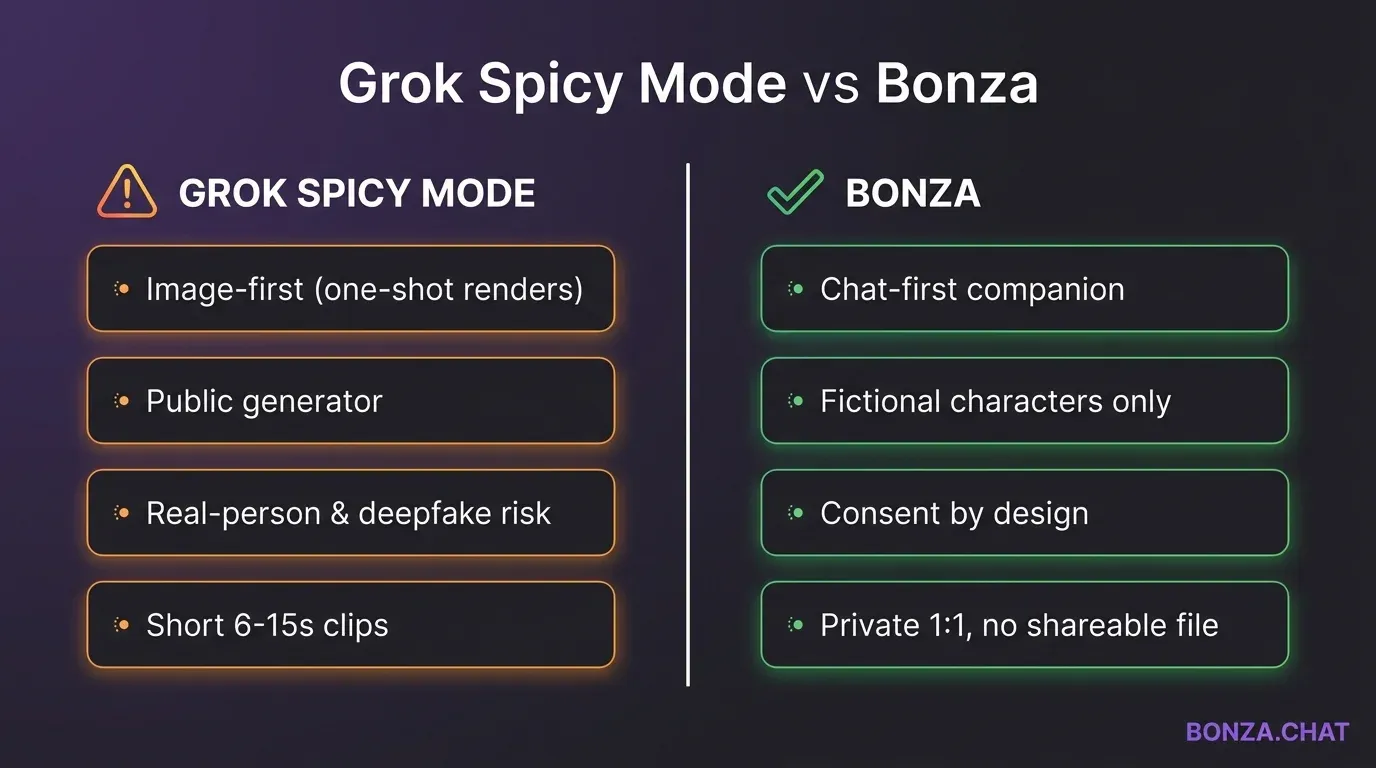
How Bonza.Chat differs from Spicy mode
Three concrete differences:
- Chat-first, not image-first. Bonza.Chat is a conversation product — characters, memory, ongoing roleplay. Grok Imagine Spicy is a one-shot render. If you want a story or a companion, you want chat; if you want a stylized still, you want a renderer. They are different tools.
- Fictional and clearly labeled. Bonza.Chat characters are explicitly fictional and styled that way. There is no upload-a-real-person flow. That’s by design — the same uncensored AI chat (fictional characters only) principle runs through every part of the product.
- Adult content lives in private 1:1, not a public generator. Spicy mode produces a file that can be downloaded, reshared, and ripped out of context. Bonza.Chat conversations are between you and a fictional character. If you want a sense of how that actually feels in practice, our writeup of how an NSFW AI girlfriend actually works walks through the mechanics.
How to choose: when Spicy mode makes sense, and when it doesn’t
A short decision frame to keep this honest:
- You want a stylized fictional image or a few-second clip and you understand the gating. Grok Imagine Spicy can do that. Use it on clearly fictional subjects, accept that filters are imperfect, and keep outputs to yourself unless you have rights to share them.
- You want a companion, a flirty back-and-forth, or sustained roleplay. That isn’t what an image generator does. A chat-first product like an AI girlfriend is the right shape of tool. Same goes for sexting-style chat: see AI sexting without the deepfake risk for what that looks like done responsibly.
- You’re tempted to generate something — anything — of a real person. Don’t. Not a celebrity, not an ex, not a coworker. There is no version of that which is okay. Close the tab.
If you’re somewhere in between — curious about adult AI, unsure which lane you want — start with chat. Chat is lower-stakes, leaves no shareable file, and tells you quickly whether you want the experience at all.
Frequently Asked Questions
Is Grok Spicy mode free? Not in most regions. Grok Imagine and Spicy mode have been gated behind paid Grok / X Premium tiers, and the exact tier required has changed across rollouts. Some users on free plans see Grok Imagine in a limited form but not Spicy. Because xAI updates pricing and entitlements frequently, check the current Grok / X Premium page rather than relying on any specific dollar amount quoted in a third-party article.
Why is Spicy mode not showing up in my Grok app? Most often: your X account isn’t set to display sensitive media, your account isn’t age-verified, you’re on a plan or in a region without Spicy access, or your app build is older than the rollout. On Android specifically, the feature has lagged iOS in several updates. Update the app, confirm the sensitive-media setting, and confirm your subscription before assuming it’s broken.
Does Spicy mode work on Android? Yes, but rollout has trailed iOS. Some Android users have seen Grok Imagine without Spicy, and some Android regions have been delayed entirely. If you’re on Android and don’t see it, update to the latest build, then check your region and subscription. If all three line up and it still isn’t there, you’re waiting on xAI’s rollout, not missing a trick.
Can Spicy mode generate explicit content of real people? xAI’s policy says no, and there are filters that try to block likenesses of public figures and reject obvious targeting. Independent reporting shows the filters are inconsistent. The right answer isn’t “find the gap” — it’s don’t do it. Nonconsensual sexual imagery of real people is harmful and often illegal in the US, regardless of which tool produced it.
Is there a Spicy mode for uploaded images? Grok Imagine supports image-conditioned generation in some flows. xAI’s documented behavior restricts what Spicy will do with an uploaded photo, especially when it appears to depict a real person. We won’t describe workarounds. If the system refuses your upload, that refusal is the feature working — treat it as a stop sign, not a puzzle.
What’s the difference between Grok Spicy mode and Grok’s chat? Grok chat is text conversation with the Grok assistant. Spicy mode is a render setting inside Grok Imagine, the image-and-video generator. Turning Spicy on does not change how the chatbot talks to you, and chatting with Grok does not produce Spicy images. They are separate features in the same app.
What are responsible alternatives? For adult AI chat, look for products that are explicitly fictional-only, age-gated, and don’t support real-person likeness. Bonza.Chat spicy AI chat on Bonza.Chat is built that way on purpose: characters are fictional, access is gated, and the product is chat-first rather than a public image generator.
Bottom line
Grok Spicy mode is a real feature with real limits — and real risks when it’s pointed at real people. If you want a stylized fictional image, it can do that within its gating. If you want a companion, a conversation, or adult roleplay without the deepfake exposure, a chat-first product is the better fit. See Bonza.Chat pricing for what that looks like on our side, or try Bonza.Chat free and decide for yourself.